


Dream Road: Online
4.4365.00 Reviews
App Specs
- Version
- 1.4.3
- Updated On
- License
- Free
- Downloads
- 10,000,000+
- Developer
- ARDENT GAMES
- Categories
- Racing
- Platform
- Android, iOS
Screenshots



 Analysis by AppCompare
I like racing games best when the first few minutes tell me what I’ll actually be doing: getting behind the wheel, learning how a car responds, and finding a reason to take one more drive. Dream Road: Online is built around that pull. It is a free racing game from ARDENT GAMES, and its city setting gives the driving a social, open-road feel rather than making every moment seem like a formal competition.
That makes it an easy game to try when I have a short break and want to roam, tune a car, or meet up with friends. It has attracted more than 10 million installs and holds an average rating of 4.3 from around 26,000 ratings, so there is a sizable audience for its mix of driving and online play. The key question for me is whether the loop stays enjoyable after the first burst of novelty: drive, get feedback from the game, work toward something, then decide whether another run is worth it.
From the first drive to the next session
I find that a good way to approach a session is to choose its purpose before I start: a relaxed city drive, a task to work through, or time with a friend. That small choice makes the game’s different pulls easier to enjoy without treating every visit as a race for progress. It also gives me a useful reason to come back when I have a different mood or a little more time.
Getting started and choosing how to drive
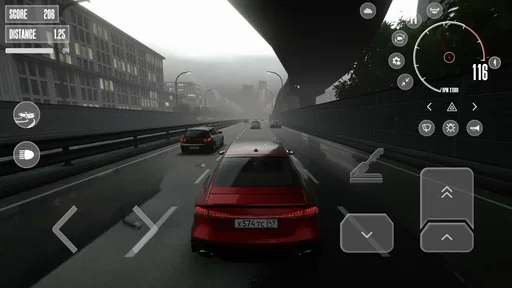
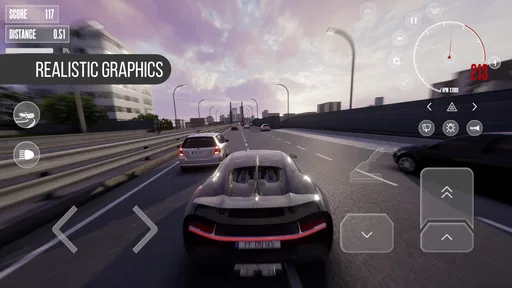
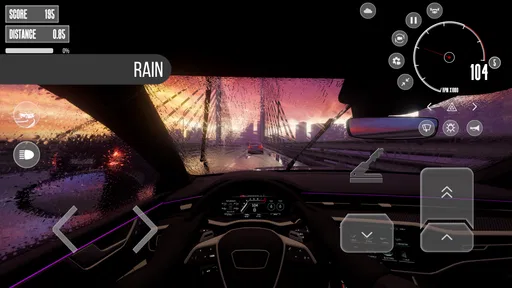
Diving into Dream Road: Online is like stepping into a vibrant world of possibilities. The game welcomes you with a seamless setup, making it super easy to get started. Once you're in, it’s all about exploring. The graphics? Absolutely stunning. It’s like they've captured the essence of a road trip and splashed it across your screen. You’ll find yourself lost in the details, from the lush landscapes to the bustling cityscapes.
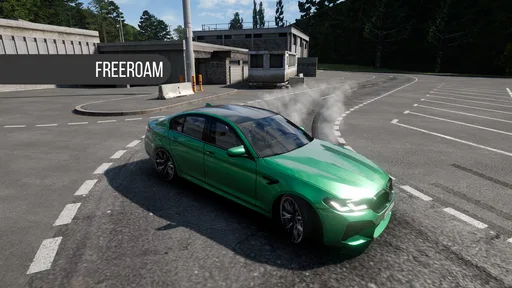
The game offers a variety of vehicles to choose from, each with its own unique charm and handling. Whether you’re a fan of sleek sports cars or rugged off-roaders, there’s something for everyone. It’s like having your very own garage without the maintenance hassles.
For a new player, I’d treat the opening drives as a chance to find a comfortable rhythm rather than rushing straight toward the most ambitious goal. Try a car, notice how it feels in turns and on longer stretches, then decide whether you want to focus on exploring or improving that vehicle. That small pause can save you from spending effort on a style of driving you don’t enjoy. In a game built around both cruising and racing, the car that looks exciting in the garage is not automatically the one that feels right on the road.
The city setting also changes how I think about a quick session. I don’t need to frame every visit as a serious race night; I can use a few minutes to drive around and get reacquainted with the controls, then return later when I have time to play with friends. If I’m choosing a game for a commute break or a short wait, that flexible mood is a better fit than a racing title that makes every session depend on a long event or a tightly structured campaign.
Worth Reading Before You Choose

Baby Panda World Brings Quick Play to Modern Phones, but Its Game Library Feels Busy

ESPN’s Live Game View Makes Following Close Games Easier

QuizzLand Review: A Good Fit for Short Trivia Breaks, Not Every Player

Basketball Stars: Multiplayer Is Fast, but Can It Recover When Matches Go Wrong?

WEBTOON Turns Phone Updates Into a Better Reading Routine

Link to Windows Runs on Shared Habits, Not Social Feeds
How the driving loop gives feedback
What truly sets this game apart is its engaging gameplay. You're not just driving; you're on a mission. There are tasks to complete, challenges to conquer, and the thrill of unlocking new routes and adventures. It keeps you on your toes and makes every drive a new experience.
The useful way to approach that loop is to pay attention to what each task asks you to do before committing to a long stretch of play. A challenge can give a drive purpose, while free exploration lets you enjoy the city without treating every turn as a test. I’d alternate between the two: use missions when I want a clear target, then cruise when I want to relax. That avoids turning the game into a checklist and helps the open-road side feel like a choice, not wasted time.
Racing games often lean heavily in one direction: some are focused on tightly scripted events, while others prioritize collecting cars or competing in short, repeatable matches. Dream Road: Online sits closer to a shared city-driving experience, where tuning and meeting other players are part of the appeal. That is a useful distinction if you’re deciding what to install. If you want a more structured single-player progression or a simulation that asks you to master realistic driving technique, a more specialized racing game may suit you better.
The feedback rhythm is strongest when a drive leads to a visible next step, whether that means completing a task, trying a different route, or getting closer to a car setup you like. It is less compelling if you need every race to deliver a dramatic result. I enjoy it most when I set a modest aim before I start—finish a task, test a car, or meet a friend—because then even a short run feels complete rather than like a race cut short.
Multiplayer, friends, and everyday play
I found myself particularly drawn to the multiplayer mode. Here, you get to connect with other players, which adds a competitive edge to your journey. It’s like being part of a community of road warriors. You can team up for challenges or go head-to-head in races. It’s social, it’s fun, and it’s a great way to meet fellow enthusiasts.
A realistic use case is a quick evening session with a friend: agree on a simple goal, meet in the game, and make the drive itself the entertainment rather than expecting a long, carefully planned tournament. That works especially well for people who already enjoy comparing cars or turning casual play into a friendly contest. If your friends are not online, the tasks and solo exploring still give you something to do, but the social side is less of a draw when you are playing alone.
One practical tip is to decide beforehand whether you’re logging in for company or for progress. When I want to chat and race casually, I would avoid judging the session by how much I advanced. When I want to work through challenges, I’d focus on those instead of splitting my attention between several goals. Keeping those moods separate makes the online element feel more relaxed and reduces the chance that a casual meet-up becomes a frustrating attempt to optimize every minute.
Online play does come with a trade-off: it depends on a stable connection and on other players being available for the kind of session you want. The game can feel lively when people are around, but server hiccups can interrupt that momentum, particularly at busy times. If uninterrupted solo play is your priority, that friction matters more than it would for someone who mainly wants to share the road with friends.
Tuning, rewards, and where patience matters
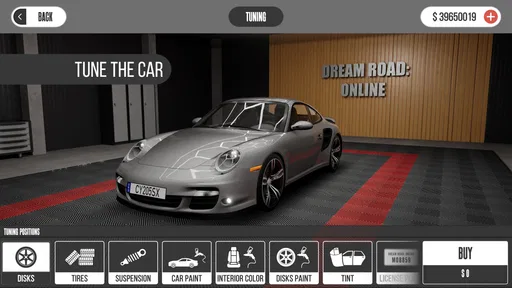
Another feature worth mentioning is the customization. You can tweak and tune your rides to match your style. Want a car that reflects your personality? Go for it! The upgrade options are pretty robust, allowing you to enhance performance and aesthetics. It's a dream come true for gearheads and casual players alike.
For me, the best way to approach tuning is to change one thing at a time and then drive again. If I alter several parts at once, it becomes harder to tell which change made the car more enjoyable or less predictable. That is a small but useful habit in a game where the feel of a vehicle is part of the reward. It also helps keep customization from becoming a guessing game in which I spend resources without learning what I actually prefer.
The reward loop has a clear temptation: a new improvement makes the next drive feel within reach, and that can encourage another task or race. The downside is that some upgrades can demand a substantial amount of in-game currency. I would avoid spending impulsively on every appealing option. Pick a vehicle you genuinely like, focus on changes that support how you drive, and let cosmetic choices wait if progress feels slow. That keeps the grind from taking over the part of the game you installed it for.
Plus, the game frequently updates with new content, keeping things fresh and exciting. You never really run out of things to do, and there’s always a new adventure waiting around the corner.
That ongoing sense of possibility is appealing, but it is not a guarantee that every session will feel equally rewarding. If I have only a few minutes, I’d choose a quick, self-contained goal rather than expecting a major unlock. If I have more time, I can explore, take on several tasks, or spend longer comparing a car’s feel after tuning. Matching the session to the amount of time available is a better way to enjoy the game than chasing a large reward every time I open it.
Friction, device fit, and who should skip it
Of course, no game is without its quirks. Sometimes, the in-game economy feels a bit skewed, with certain upgrades requiring a hefty amount of in-game currency. But hey, isn’t that part of the challenge? It pushes you to engage more with the game, complete those missions, and earn your way up the ranks.
Occasionally, there’s a hiccup with the server connectivity, especially during peak hours. It can be a tad frustrating, but the developers seem committed to ironing out these issues with regular updates.
Those are not just minor inconveniences for everyone. A player who dislikes repeating activities to afford upgrades may find the economy tiring, while someone who mainly wants to cruise or play socially may be less bothered by it. Likewise, if a connection drops at the wrong moment, the online focus can interrupt the relaxed feeling that the city is meant to offer. I’d skip this one if you want a fully offline racer, a highly realistic driving simulator, or a progression system that moves quickly without asking you to repeat tasks.
It is also worth checking that your device is compatible before downloading: the game supports Android 7.0 and newer. Its Everyone age rating makes it broadly suitable from a content-rating perspective, though I’d still consider whether online interaction is appropriate for the person using it. The current version is 1.3.5, and the game is free to install, which makes trying it a low-commitment choice if the mix of city driving and multiplayer sounds appealing.
Dream Road: Online is most convincing for casual racing fans who enjoy tuning, a shared world, and the freedom to choose between a task and an unhurried drive. It is less suited to players who want a pure time-trial challenge or an offline campaign with a predictable pace. Knowing that distinction before you start helps set the right expectation: this is as much about the company and the car you’re shaping as it is about winning a race.
When another drive feels worth it
The session reset is part of the appeal. A drive ends, but there is usually another small reason to return: test a different car, make progress on a task, adjust a setup, or see whether a friend is around. I like that these are different reasons to play, because they let the game fit both a quick visit and a longer evening. The drawback is that the next goal can feel less inviting when it asks for a lot of currency or when connection problems break the flow.
All in all, Dream Road: Online offers an exhilarating gaming experience. It’s visually captivating, packed with engaging content, and provides a platform for social interaction. Whether you're a casual gamer or someone who likes to dive deep into quests, this app has something for everyone.
If you’re looking to escape reality for a bit and feel the wind in your hair (virtually, of course), this game is definitely worth a download. So, what are you waiting for? Grab your device, hit the road, and let the adventures begin!
Pros
- Engaging gameplay with evolving challenges.
- Vibrant graphics enhance user experience.
- Smooth multiplayer interactions.
- Regular updates keep content fresh.
- Intuitive controls make it user-friendly.
Cons
- In-app purchases can be expensive.
- Requires constant internet connection.
- Occasional lag in crowded servers.
- Limited customization options.
- Ads can be intrusive at times.
FAQs for Dream Road: Online
What is Dream Road: Online, and how does it work?
Dream Road: Online is a multiplayer adventure game available on both Android and iOS platforms. It allows players to explore vast worlds, embark on quests, and engage in real-time interactions with other players. The game combines elements of strategy, role-playing, and adventure, making it a captivating experience for gamers seeking a dynamic and social gaming environment.
Is Dream Road: Online free to play?
Yes, Dream Road: Online is free to download and play. However, it offers in-app purchases that can enhance the gaming experience. These purchases may include special items, customization options, or premium features. While these aren't necessary to enjoy the game, they can provide added benefits and convenience for players who choose to invest.
What are the system requirements for Dream Road: Online?
For Android users, Dream Road: Online requires a minimum of Android 5.0 and at least 2GB of RAM for optimal performance. iOS users need to have iOS 11.0 or later. The game is designed to run smoothly on most modern devices, ensuring a seamless experience as you explore its vibrant world and engage in its diverse gameplay.
Can I play Dream Road: Online offline?
No, Dream Road: Online requires an active internet connection to play. This is because the game features real-time interactions and updates that are essential for its multiplayer component. An internet connection ensures that players can enjoy the full experience, including social features and live events.
What kind of support is available if I encounter issues with Dream Road: Online?
Dream Road: Online provides extensive support through its in-game help section, which includes FAQs and troubleshooting tips. Additionally, players can contact customer support via the app or the official website for personalized assistance. The support team is responsive and aims to resolve any issues swiftly, ensuring a smooth gaming experience.


